iOS · AI Engineering · Product Launch
iPhone Duo App Migration Is a Build Flag, Not a Redesign
Black bars on the iPhone Duo come from the SDK you last compiled against, not from your design. Apple's own fix is an AI code-mod it admits is incomplete.
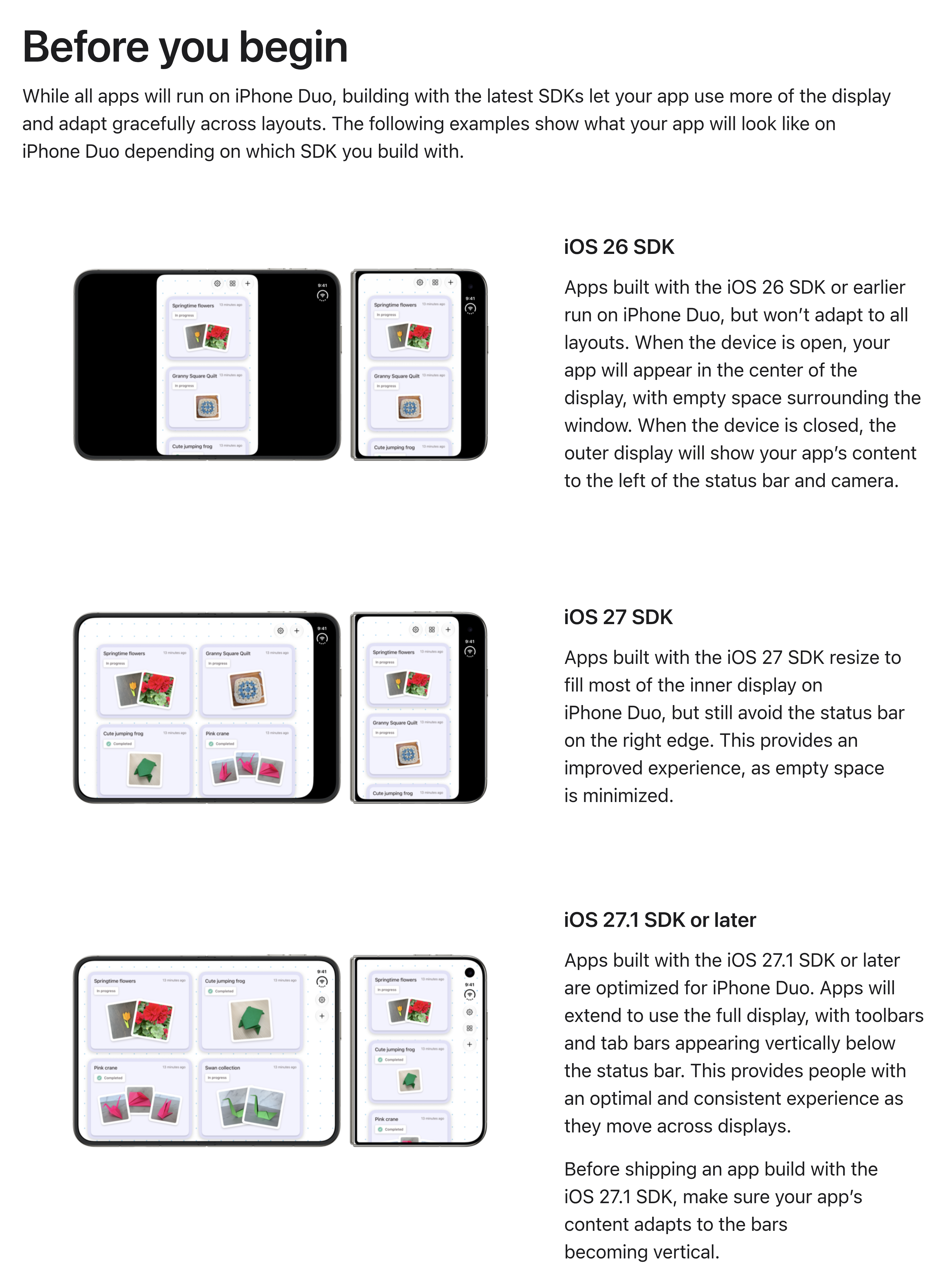
If your app looks broken on the iPhone Duo, that is not a design failure. It is a build setting. Apple's own developer documentation states that how your app renders on the $2,000 folding iPhone is decided by one thing — the SDK you last compiled against. Built with iOS 26 or earlier, your app sits in the center of the display "with empty space surrounding the window." Built with iOS 27, it fills most of the inner display. Built with iOS 27.1 or later, it uses all of it. No redesign, no entitlement, no App Store flag.
The Duo went on sale on 23 October 2026. Two days in, the thing people keep pointing at is not the hinge. It is which apps look like they belong on the device and which ones look abandoned.
The three tiers everyone can see
The Verge's review sorts apps into three buckets, from the user's side, and never says what puts an app in one. First, "regular iPhone apps that haven't been updated at all," which "look pretty silly" and are "the vast majority of apps right now." Second, "the messy middle: apps that have been updated for iOS 27," where "you can tell they haven't actually been designed for these displays." Third, "fully updated Duo apps built for the Duo-specific iOS 27.1."
TechCrunch, writing on 24 October from an Apple-supplied review unit, describes the same launch-day state: "Many of the apps you use every day were not optimized by launch day, meaning they're surrounded by black bars, have their controls in odd places, or have to be enlarged with a tap."
Now put that list next to Apple's. The comparison at the top of this page is Apple's own, published under the heading "Before you begin": the same sample app built three times, against three SDKs, producing three outcomes. Three observed tiers of app quality, three SDK tiers, same list.
That is the part the coverage left out, and it changes what the problem is. The distance between "designed for this phone" and "abandoned" is not a design sprint. It is a compiler flag plus a bounded cleanup.
What is verified here, and what is Apple's word for it
Everything above comes from pages we read directly on 25 October 2026 — Apple's developer site plus two independent reviews, all linked at the end. A few things in this post are not verified, and they are worth weighing as what they are:
- The tool's effectiveness is a vendor claim. "The skill finds most issues, but not all of them" is Apple assessing Apple's own tool. We did not run it; that needs Xcode on macOS, which this analysis did not have. We can tell you what Apple says it does. We cannot tell you its hit rate.
- Those three comparison images are Apple's renders of a sample app, not photographs of shipping apps on real hardware. They illustrate Apple's description of the tiers. They are not evidence of how any particular app behaves.
- The list of apps said to be Duo-ready at launch — Netflix, the MLB app, NYT Cooking, Slack, Fantastical — comes from Apple's launch press release, relayed by TechCrunch. We checked four of those US App Store product pages and found no Duo-specific media shelf, which settles nothing either way; the web storefront may simply not surface those assets yet.
- Hardware figures (5.4-inch outer display, 7.6-inch inner, $2,000 starting price) are Apple's published specifications, repeated by the press. Nobody in this analysis measured them.
The SDK tiers, the code patterns and the April 2027 date are the verified part, and they are the part the rest of this post rests on.
Apple shipped the migration as an AI code-mod
Here is what nobody is writing about. Step 1 of Apple's official guide to adopting its new flagship device is not a design task. It is: run an agent on your codebase.
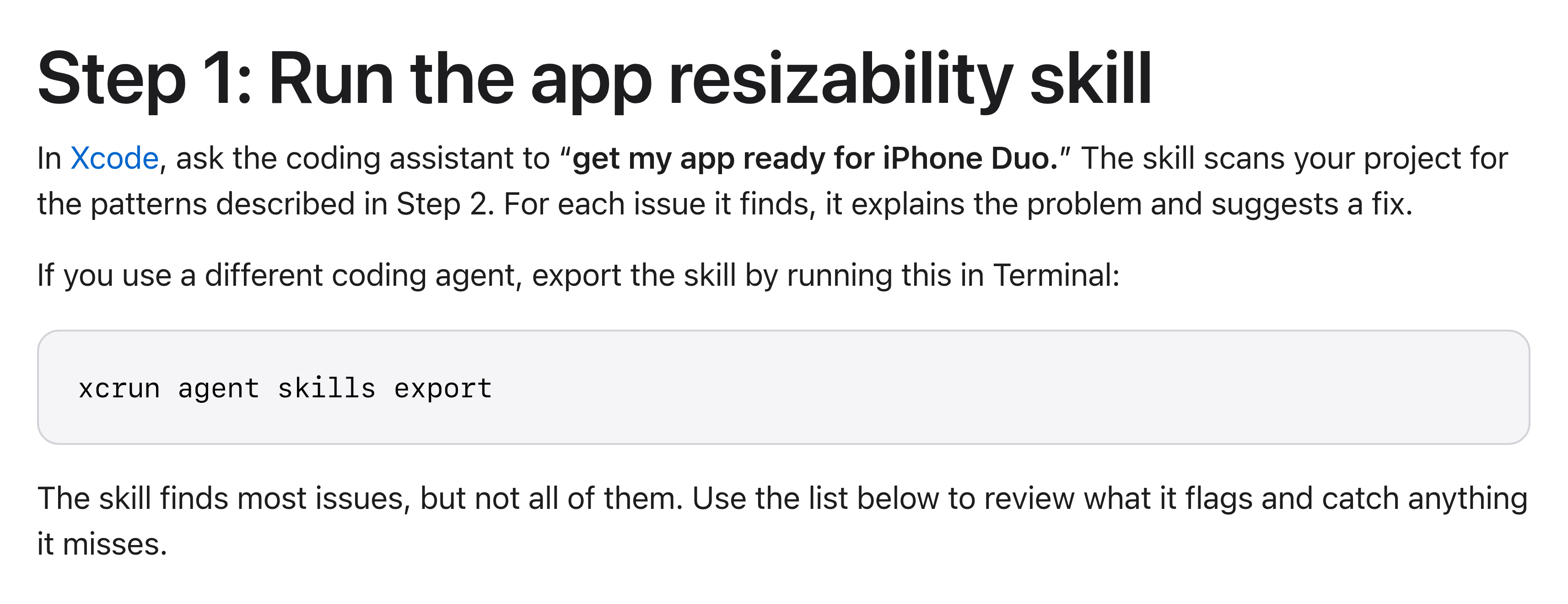
Step 1 is "ask the coding assistant" — with xcrun agent skills export for teams who work outside Xcode — followed by Apple's own caveat. Source: developer.apple.com/iphone-duo/prepare/
Read the last line again, because Apple put it in the same block as the instruction: "The skill finds most issues, but not all of them. Use the list below to review what it flags and catch anything it misses."
The platform vendor has made an AI code-mod the first step of adopting its flagship device, and documented in writing that the code-mod is incomplete. That is a remarkably honest piece of developer documentation, and it quietly relocates the work. The migration is no longer the hard part. The review is.
What the agent is supposed to catch — and what you own
Step 2 of Apple's guide is the human checklist, and it is an inventory of ordinary rot that accumulates in any iOS codebase older than a couple of years:
UIScreen.mainandUIScreen.main.boundsUIDevice.current.orientation,statusBarOrientationandinterfaceOrientation, includingwindowScene.effectiveGeometry.interfaceOrientationuserInterfaceIdiom == .phoneand== .pad- treating
horizontalSizeClass == .regularas "this is an iPad" - literal device-size comparisons such as
bounds.height == 844 - full-bleed media pinned to
.scaleAspectFillor.aspectRatio(contentMode: .fill)
None of this is exotic. Every one of these is a line someone wrote because there was exactly one iPhone shape and it was never going to change. A folding device is simply the first hardware that charges you for the assumption.
Worth knowing: exportable Xcode agent skills covering these same APIs have existed since June 2026 — a published xcrun agent skills export run lists seven of them, including a UIKit modernization skill described as replacing legacy shared-state APIs like UIScreen.main and interfaceOrientation. We could not confirm that the June skill and the "app resizability skill" Apple names in October are the same object, so treat them as related, not identical. The safe claim is that this tooling predates the device.
The deadline is dated, and Apple words it two ways
Apple's developer news item from 5 October 2026 states it flatly, with no conditions attached.
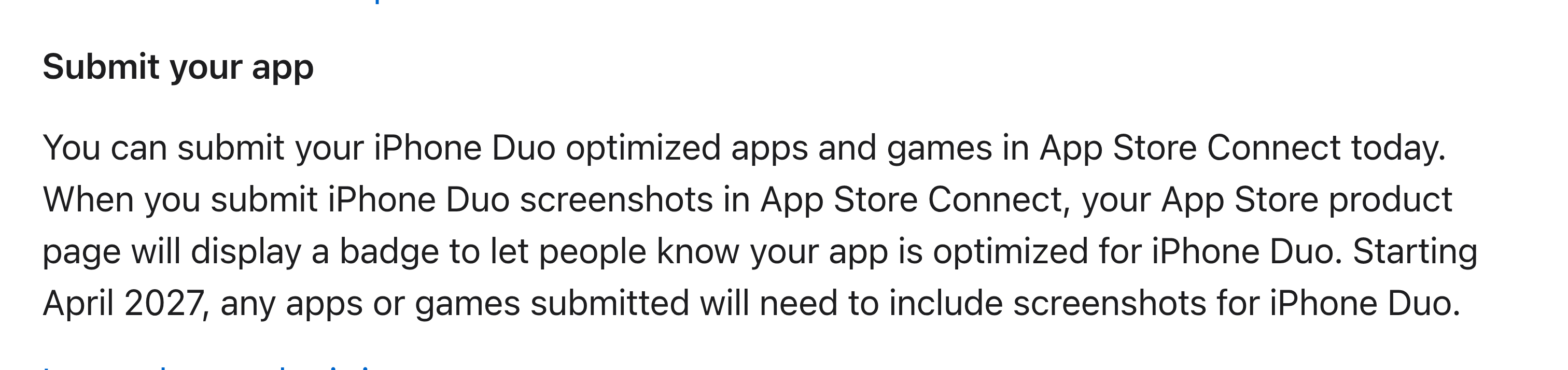
"Starting April 2027, any apps or games submitted will need to include screenshots for iPhone Duo." Source: developer.apple.com/news/, 5 October 2026
App Store Connect's screenshot specifications page states the same deadline more narrowly — and the difference is a planning fact, not a typo.
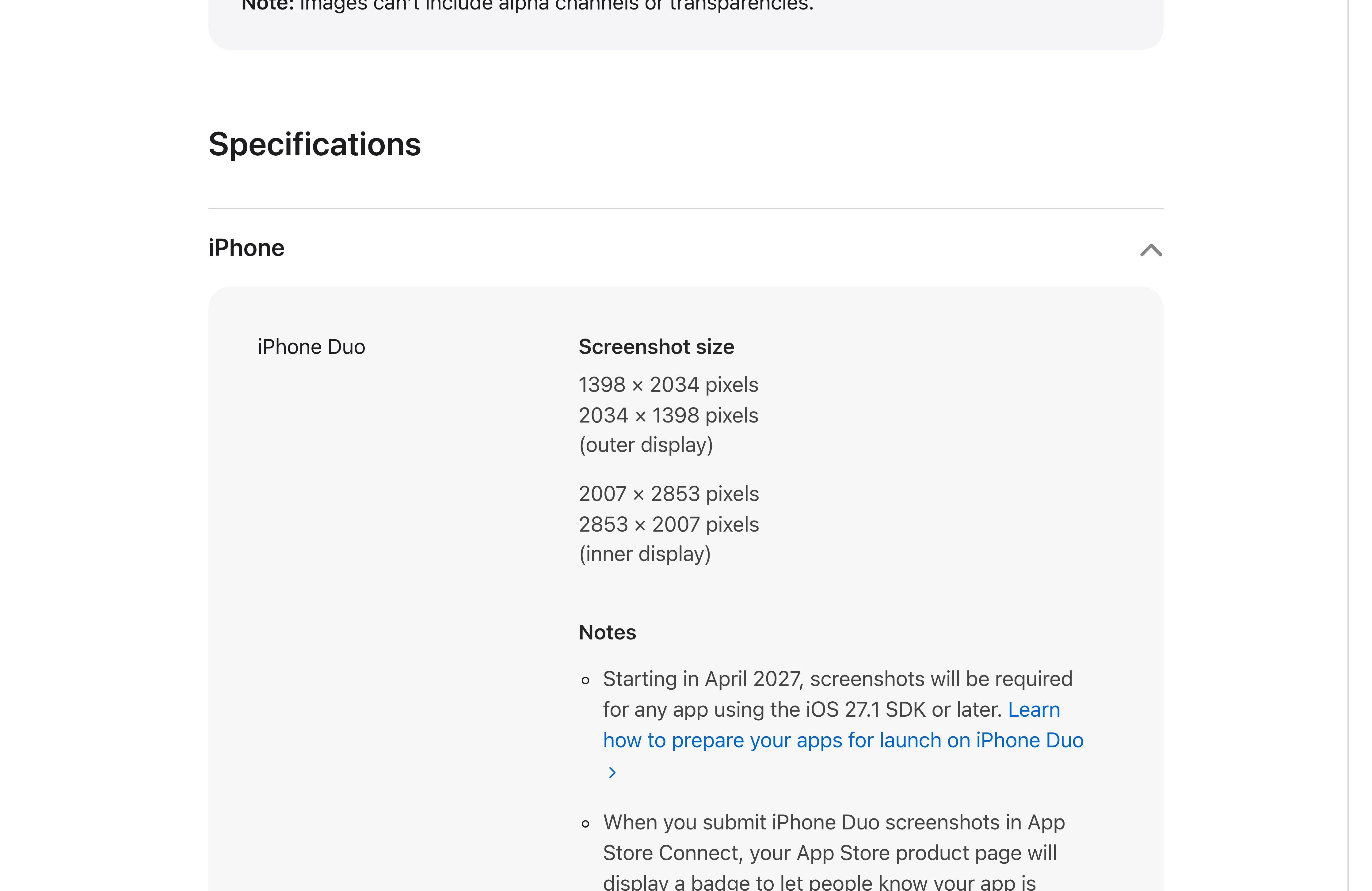
Here the trigger is the SDK: screenshots become required "for any app using the iOS 27.1 SDK or later." The page also gives the asset sizes you will have to produce for both displays. Source: developer.apple.com
| Apple page | April 2027 trigger |
|---|---|
| Developer news (5 Oct 2026) | "any apps or games submitted" |
| App Store Connect screenshot specifications | "any app using the iOS 27.1 SDK or later" |
One reading catches every submission. The other catches only apps that have already moved to the new SDK. If you are building a release calendar on the narrow reading, note that you are building it on the page that is easier to miss. iPhone Duo is also not yet in App Store Connect's "required device sizes" list, which today names only an iPhone with Dynamic Island and the 13-inch iPad — so today this is a deadline, not a blocker.
The decision, and who signs off
The price of doing this is a recompile against the current SDK plus a cleanup whose exact scope Apple published for you. An agent drafts most of it. For a mid-sized app this is a sprint, not a quarter.
The price of not doing it is that your app sits in black bars on the one device every reviewer, every investor and every journalist is holding this quarter, next to a competitor who spent that sprint. That is a brand cost paid in the only place customers look.
But the decision that actually matters is the governance one, and Apple has handed it to you in writing. When the platform vendor gives you an AI code-mod and documents that it is incomplete, three questions follow:
- Who reviews what the agent changed? A diff that touches orientation and screen-geometry code across a UI layer is not a rubber stamp. It needs someone who knows the app.
- Who owns the residue? Apple's Step 2 list exists because Step 1 does not finish the job. Name the person, not the team.
- How do you prove it was reviewed? If your answer is "it's in the PR history somewhere," you do not have an answer.
This is the same problem we work on with clients taking AI-built software to production — the generated code is rarely the risk; the unreviewed generated code is. We have written before about containing AI-written code and about the technical debt that hardcoded assumptions create. The iPhone Duo is the first time a platform vendor has written the question down on its own developer site.
Key takeaways
- How your app renders on iPhone Duo is determined by the SDK you last built against — iOS 26 or earlier gets black bars, iOS 27 gets most of the inner display, iOS 27.1 or later gets all of it.
- The three app-quality tiers reviewers describe are the same three SDK tiers Apple documents. A recompile moves you a tier.
- Step 1 of Apple's official adoption guide is to run an AI coding-agent skill, and Apple states that the skill "finds most issues, but not all of them."
- The fix list is ordinary legacy code:
UIScreen.main, orientation APIs, idiom checks, size-class assumptions and hardcoded screen heights. - From April 2027 the App Store requires iPhone Duo screenshots. Apple's two pages word the trigger differently — one on submission, one on the SDK.
- The migration is cheap. The review of what the agent missed is the part that needs an owner.
FAQ
Do I have to redesign my app for the iPhone Duo? No. Apple's documentation makes the rendering tier a function of the SDK you compile against, not of your design. A recompile against iOS 27.1 moves an app from black bars to full display. Designing well for the fold is a separate, optional investment on top of that.
What happens if I do nothing? Your app keeps running. It renders in the center of the inner display with empty space around it, and shows a black bar on the right of the cover screen. From April 2027 you also hit the screenshot requirement on your next submission.
Is the Apple coding-agent skill safe to run on a production codebase? Treat it like any agent-generated diff: run it on a branch, review every change, and have a named person sign off. Apple itself says it does not catch everything, which makes the review step part of the procedure rather than an optional extra.
Can I use the skill outside Xcode?
Yes. Apple documents xcrun agent skills export, which exports the skills for use in other coding agents such as Claude, Codex or Cursor.
What screenshot sizes will I need? Per App Store Connect: 1398 x 2034 and 2034 x 1398 pixels for the outer display, 2007 x 2853 and 2853 x 2007 pixels for the inner display.