Privacy · Vendor Risk · Product Engineering
AI Assistants Read Your Screen: Signal's Blunt Fix
Signal blocked AI assistants from reading its screen with a two-second race and a private Apple class. Your app leans on the same platforms.
The app whose entire product is "nobody else can read this" spent last week telling its users that the AI assistant on their phone can read their messages — and that the fix it shipped is incomplete. Signal's post is signed by its president, Meredith Whittaker, and the headline everyone picked up was the simple one: Gemini and Siri can see your screen.
The part nobody explained is where the difficulty actually sits. Blocking screen capture is easy and supported — on Android it is one documented window flag. What no mobile platform gives you is a way to know that an AI agent, rather than the task switcher or the user's own thumb, is the thing reading the screen. So Signal guesses: a stopwatch on Android, and on iOS a string comparison against a private Apple class.
That is the whole story in one screen. The most-audited messaging app on earth is defending your messages from the OS vendor's own assistant with a string comparison against an undocumented Apple class — because that is the best tool available to it.
What AI screen reading costs you
If Signal cannot close this cleanly, your app cannot either. The exposure is not Signal's; it is anyone who ships a mobile app that promises confidentiality — legal, health, HR, finance, the internal tool with payroll in it. The OS assistant is a data path you never contracted for, cannot audit, and will not find in a log.
Three things make that expensive rather than merely annoying.
The only lever is blunt. On Android, the supported control kills every screenshot in your app, including the ones your users want. Signal did not pull it. Its own footnote says that for many non-Pixel vendors it has no reliable way to detect a screenshot attempt, so rather than confuse users by making screenshots simply stop working, it focused on detecting assistant access instead — which is exactly what the shipped code does. Coverage described Signal as blocking screenshots on Android; on Android that is not what happens by default.
What Signal did ship cannot be described as enforced. The protection switches on only after an assistant has already asked for the screen. It is gated behind a remote config flag Signal can turn off server-side. The user can turn it back off, and if they do, Signal will not ask again for 90 days. Every one of those is defensible product design. None of them survives the question an auditor or an enterprise buyer actually asks, which is not "do you have a control" but "is it on, for everyone, always."
You cannot subcontract the promise. That sentence in your privacy policy, your DPA, or your last security questionnaire about confidential data staying inside the app is not a control you own. It is a dependency on Apple and Google, and it belongs in your risk register next to your cloud provider — not in your marketing copy. We end up rewriting that sentence on mobile engagements we take to production.
What is verified here, and what is Signal's own word
We read the shipped source, at specific commits, on 22 November. Everything described below about how the code behaves is from that reading, not from the announcement.
Two claims that matter most, however, are Signal's own and we could not check them. First, that these measures actually stop Gemini and Siri from reading Signal content: we confirmed the code path exists and what it does, not its effect on the assistants, which is not observable from outside the OS. Second, that Apple, Google and Microsoft offer no way to opt an app out of AI data access without drastic compromises to the experience. The unsupported workarounds in Signal's own source are consistent with that, but we did not audit the vendors' full API surface.
Signal's characterisation of Microsoft Recall, its account of what is possible on macOS, its statement that some OS providers are engaging with it, and Whittaker's framing of this as an existential threat are all the position of the organisation making the announcement. Neither The Verge nor TechCrunch obtained a response from Apple or Google.
The blocking is boring. The aiming is the hard part.
On Android, the enforcement primitive is ordinary. A helper called initializeScreenshotSecurity() adds FLAG_SECURE to the window when screen security is on and clears it when it is off. Documented, supported, unremarkable — which is precisely what locates Signal's complaint. The platform will let you block capture. It will not tell you who is capturing, and it will not let you block only them.
To detect the assistant, Signal implements Application.OnProvideAssistDataListener — the generic Android Assist callback. Its own class comment states the problem: the task switcher requests assist data too, and so does an ordinary screenshot. One callback, three very different events, no identity attached.
So it separates them with timing:
- If the activity has lost window focus, the request is ignored — that is the recent-apps screen.
- On Android 14 and newer, a request landing within a three-second lookback of a detected screenshot is discarded as the user's own.
- Otherwise the response is deferred by a two-second grace period, to see whether a screenshot shows up after all.
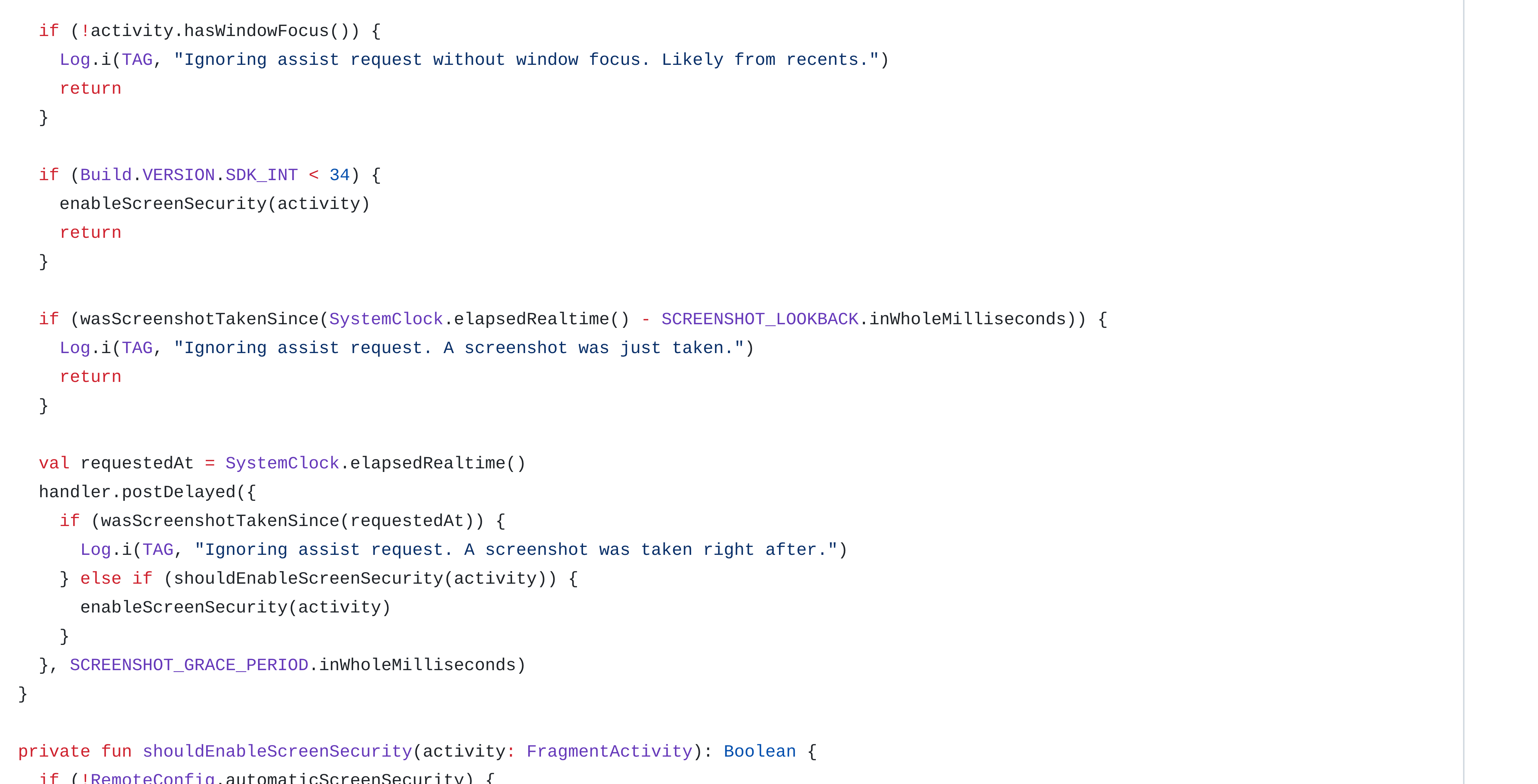
The same change adds a screen-capture detection permission to feed that heuristic. On Android 13 and older there is no disambiguation at all — the lock engages immediately, so a user taking their own screenshot can trip it.
Note the shape: the switch is flipped in response to a request, and on Android 14 and newer that flip is deliberately delayed by two seconds. Signal is choosing a timing risk over a feature that annoys every user every day — a product trade-off, made because the platform offered no third option.
On iOS there is no switch to flip
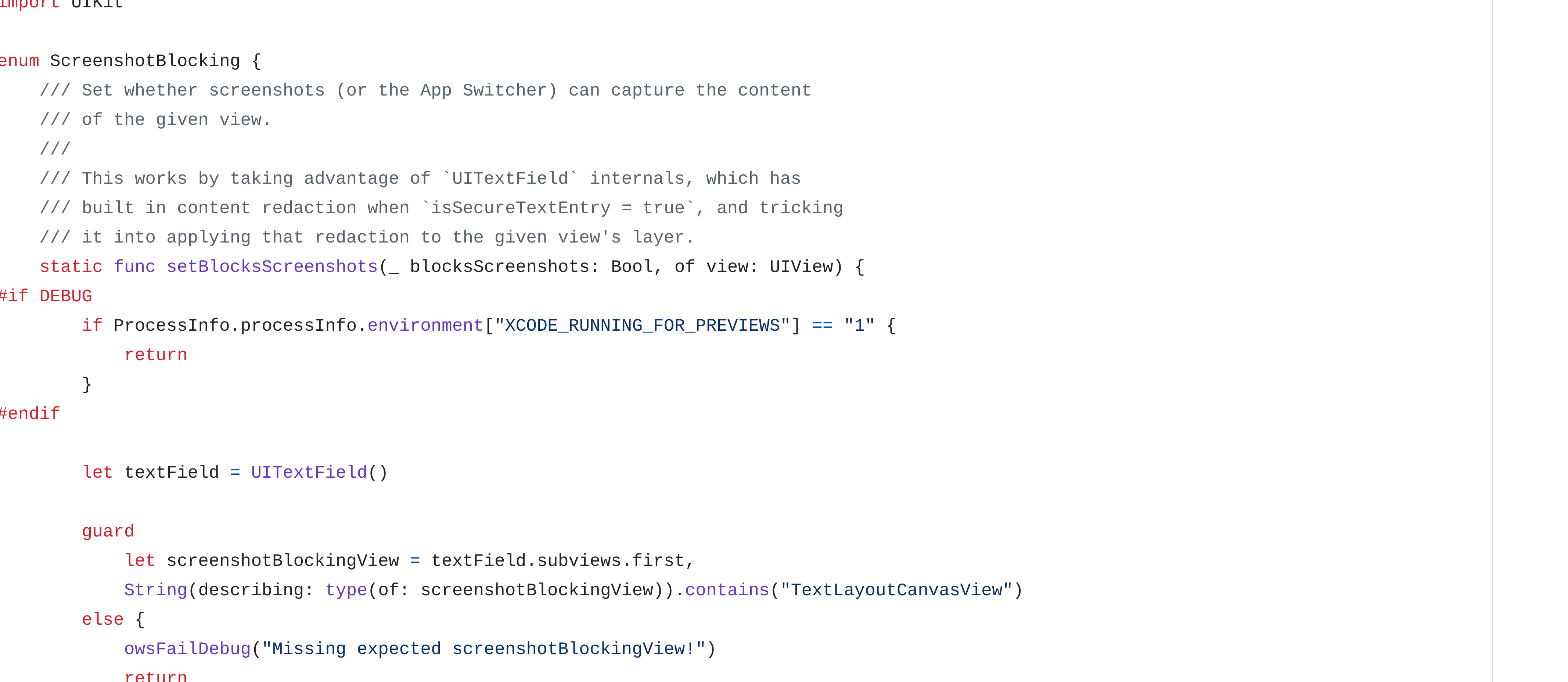
There is no FLAG_SECURE equivalent on iOS, so Signal built one. ScreenshotBlocking.swift instantiates a throwaway UITextField, takes its first subview, confirms it is the right private object by checking the class name against TextLayoutCanvasView, swaps the caller's layer in through a key-value coding call, and toggles isSecureTextEntry to force UIKit's redaction flag onto that layer. Signal's own comment describes this as tricking the text field.
The only response to Apple renaming that class is a debug assertion: in the build users carry, a failed match tells them nothing, and the redaction can stop working quietly.
That is the maintenance item, and it has a clock on it: every iOS beta is a regression test you now owe. It is the same pattern as treating an agent's context as egress — the risk is not in the feature you built, it is in the surface someone else controls.
Three decisions this forces
- Do you turn on screen-capture protection at all? On Android it costs you every screenshot in the app unless you replicate Signal's heuristic. On iOS the only known implementation is unsupported and can break on any release. Both are legitimate answers; "we never decided" is not.
- What can your privacy policy, DPA and questionnaire responses honestly claim? If your control is user-revocable and remotely gated, it is a mitigation, not an enforced control. Say the weaker thing and you are accurate. Say the stronger thing and you have a finding waiting.
- Who owns it when Apple renames a private class? Name a person and budget the hours per OS release, or do not ship the hack. An unowned hack is worse than no protection, because it reports success.
Key takeaways
- Blocking screen capture is a supported, documented operation. Neither platform lets an app know that an AI assistant is the one capturing.
- Signal's Android defence is a timing heuristic over a generic assist callback, because the platform attaches no identity to the request.
- Signal's iOS defence relies on reflection against a private UIKit class identified by name.
- A user-revocable, remote-gated, reactive control cannot be asserted to an auditor as enforced.
- Confidentiality on mobile is a vendor dependency. Put it in the risk register and fix the sentence in the policy.
FAQ
Can an AI assistant read any app's screen? Assist features operate at the OS level, so an app does not get to decide in advance. It can block capture wholesale, or detect the request and react — which is what Signal does.
Does Signal block screenshots now? On Android, not by default. Signal says it cannot reliably detect screenshot attempts across vendors, so it targets assistant access instead. Its iOS implementation is a separate, unsupported mechanism.
Is this a security vulnerability? No. There is no attacker, no CVE and no breach. The data path is the platform vendor's own shipped feature, which makes it a vendor-dependency problem and a disclosure problem, not an exploit.
What should we change this week? Read the confidentiality sentence in your privacy policy and your last three security questionnaires, and check whether it claims something only the OS could guarantee.